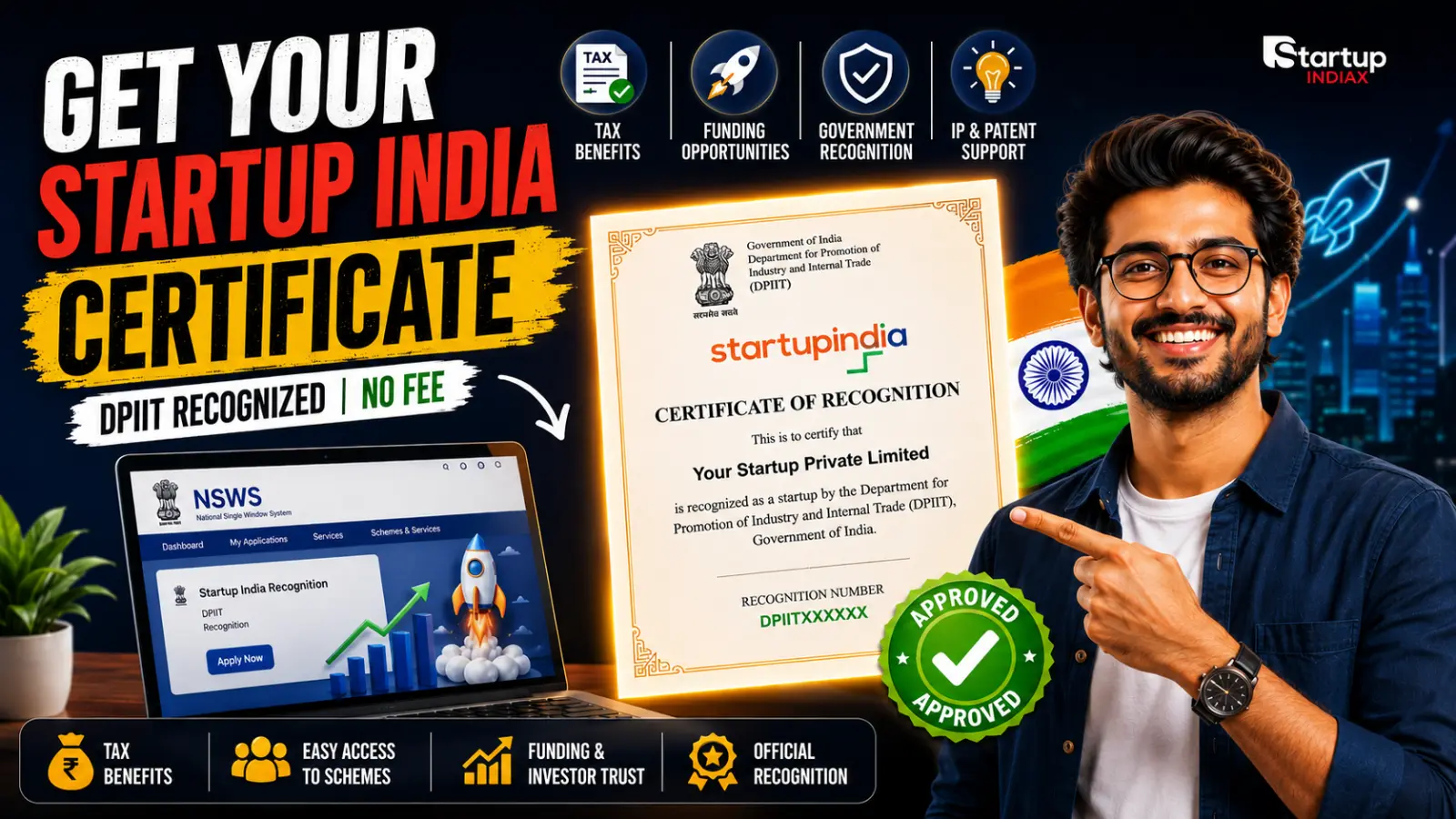
Getting the Startup India certificate is one of the most important early steps for any Indian founder today. It unlocks tax benefits, access to government schemes, easier fundraising, and recognition as an official startup by DPIIT (Department for Promotion of Industry and Internal Trade). In this guide, you’ll learn exactly how to apply for Startup India recognition online using the NSWS portal in 2026, with documents list, screenshots checklist, and common mistakes to avoid.
What is the Startup India certificate?
The Startup India certificate is an official recognition issued by DPIIT under the Startup India initiative of the Government of India. Once your company is recognized as a startup, you receive a unique Startup Recognition Number and a downloadable PDF certificate from the portal.
This recognition confirms that your business meets the government’s definition of a “startup” (innovation, age, turnover, etc.) and makes you eligible for benefits like income‑tax exemptions, easier patent filings, and access to government funding schemes.
Benefits of getting Startup India recognition
Here are the main reasons founders actively apply for the Startup India certificate today:
- Eligibility for income‑tax exemptions under section 80‑IAC for eligible startups (subject to separate approval from the Inter‑Ministerial Board).
- Faster and discounted intellectual property (IP) services such as patent filing and trademark support through the scheme.
- Better chances of getting grants, funds of funds support, and access to incubators and government‑backed accelerators.
- Signalling advantage with investors, banks, and corporate partners, because DPIIT recognition acts like an official stamp of innovation.
If you plan to raise funding or tap into government schemes in the next 1–3 years, it is worth applying early.
Read More: Startup India Seed Fund Scheme Incubators: How to Apply Now
Eligibility criteria for Startup India certificate (2026)
Before you start the application, check whether your venture is eligible. The key points are:
- Age of entity: Your company should be a private limited company, registered partnership firm, or LLP, and must not be older than 10 years from date of incorporation.
- Turnover limit: Annual turnover should not have exceeded ₹100 crore in any financial year since incorporation.
- Nature of business: The startup should be working towards innovation, development, or improvement of products/services/processes, or a scalable business model with high potential for employment or wealth creation.
- Non‑split condition: The entity should not be formed by splitting up or reconstructing an existing business.
If you don’t match these points, your application is likely to be rejected or kept on hold.
Documents required for Startup India registration
Prepare clear soft copies (PDF/JPEG) of the following before you sit to apply:
- Certificate of incorporation/registration of your company, LLP, or partnership.
- PAN of the entity and PAN of the authorised signatory.
- Founder/authorised signatory’s Aadhaar and basic KYC details.
- Brief write‑up describing your business, problem you solve, your innovation, and how it creates jobs or wealth.
- Website URL, app links, pitch deck, or product demo (if available) to support the innovation claim.
Keep all names, addresses, and dates exactly matching your incorporation documents to avoid mismatch issues.
Step‑by‑step: How to apply via NSWS portal
The Government has moved the Startup India recognition process to the National Single Window System (NSWS). Follow these steps carefully:
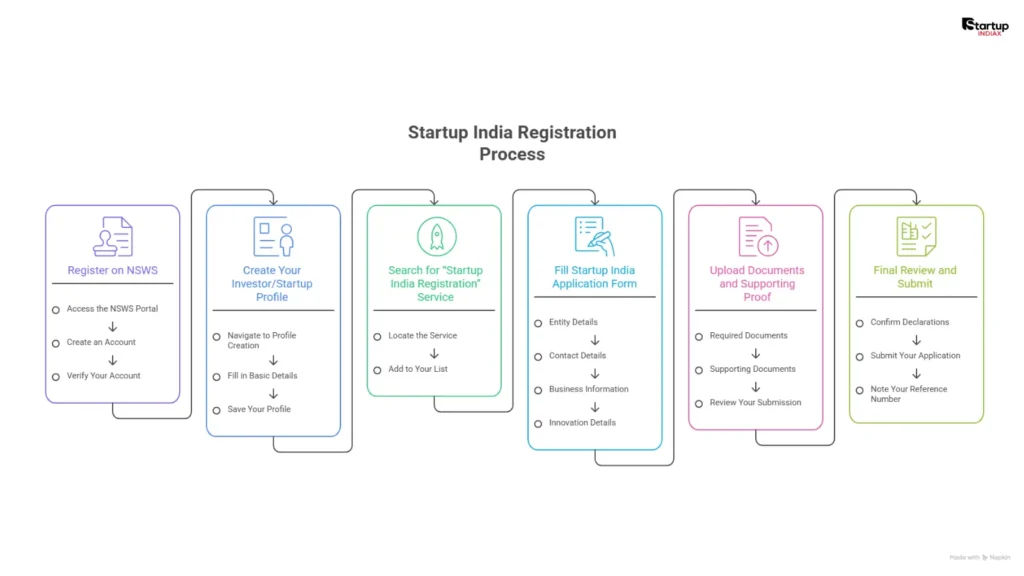
Step 1 – Register on NSWS
- Go to the NSWS portal (National Single Window System) used for central schemes and licenses.
- Click on “Register” and create an account with your email ID and mobile number.
- Verify your OTPs and log in to your new NSWS account dashboard.
Step 2 – Create your investor/startup profile
- In your dashboard, you’ll see an option to create an “Entity profile” or “Business profile.”
- Fill in basic details about the company: name, CIN/LLPIN/firm registration number, type of entity, and registered office address.
- Save the profile; this profile will be reused for other NSWS services as well.
Step 3 – Search for “Startup India Registration” service
- Use the NSWS search bar or the “Schemes and Services” section to find “Startup India Registration/DPIIT Recognition.”
- Add this service to your list and proceed to the application form.
Step 4 – Fill Startup India application form
The form will ask for:
- Entity details: incorporation date, PAN, registration type, number of directors/partners.
- Contact details: official email ID, phone number, website/app links.
- Business information: sector, sub‑sector, stage of business, number of employees.
- Innovation details:
- Problem your startup solves.
- How your solution is innovative compared to existing options.
- Evidence of traction (customers, revenue, pilots, awards).
Write these answers carefully in plain English, with specific examples and numbers instead of generic lines like “We are unique and innovative.”
Step 5 – Upload documents and supporting proof
- Upload your certificate of incorporation/registration and PAN.
- Attach a pitch deck, product demo, or any supporting document that proves innovation and scalability.
- Review all fields for spelling mistakes and mismatch between portal data and uploaded documents.
Step 6 – Final review and submit
- Tick the declarations confirming that all information is true and that you meet the Startup India eligibility criteria.
- Submit the application. There is currently no government fee for Startup India recognition itself, but normal incorporation costs are separate.
- Note the reference number/acknowledgement for future tracking.
After submission, your application goes to DPIIT for review. If they need clarification, they may email you for more details or keep the application “On Hold” until you respond.
How long does Startup India approval take?
Founders commonly report that straightforward applications with clear documentation can get approved within a few days to a couple of weeks. However, if DPIIT asks for clarifications or if there is a backlog, the process can take longer.
Keep checking your email and the NSWS/Startup India portal for status updates so you can respond quickly if any queries are raised.
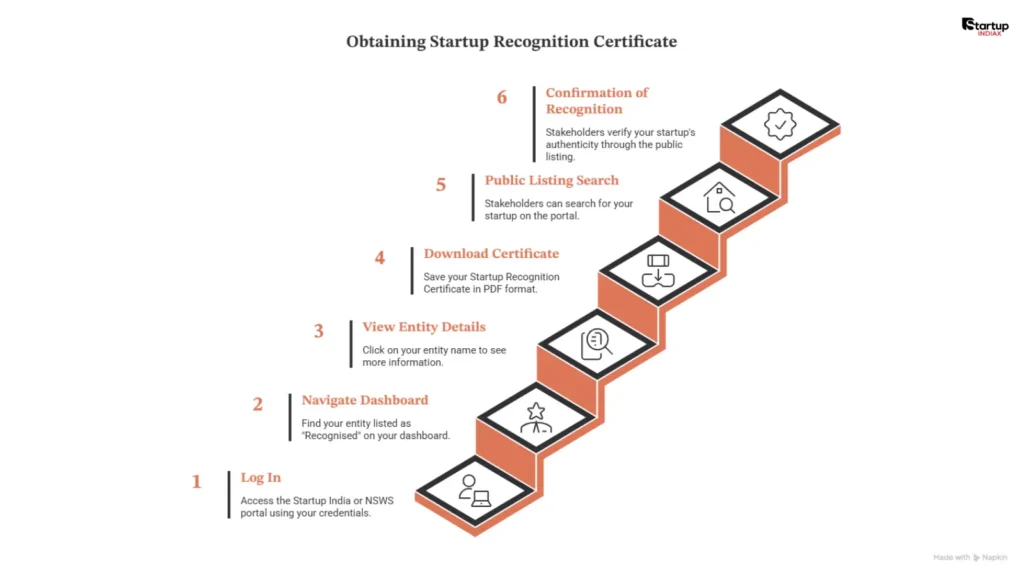
How to download and verify your Startup India certificate
Once your startup is approved:
- Log into the Startup India or NSWS portal with the same credentials you used for the application.
- Go to your dashboard; you should see your entity listed as “Recognised.”
- Click on the entity name to view details, and there will be an option to download your Startup Recognition Certificate (PDF).
- For verification (for investors, banks, clients), they can search your startup’s name or recognition number in the public listing on the Startup India portal to confirm authenticity.
Always save the PDF in multiple locations (cloud, email, local storage) and keep your login details secure.
Read More : The Indian Startup Funding Guide
Common reasons for rejection or “On Hold” status
Many founders face rejection or long delays because of avoidable mistakes. Some common issues are:
- Weak or generic “innovation” description that doesn’t clearly differentiate from existing businesses.
- Documents not matching the details entered on the form (name, address, incorporation date mismatches).
- Business model is basically a regular trading or service activity with no scalable or innovative component in the eyes of DPIIT.
- Entity older than 10 years or turnover crossing the prescribed limit.
If your application is on hold, you can usually respond with clarifications, better explanation of innovation, and additional proof such as user traction or product demos.
What to do after getting recognised
Getting the Startup India certificate is the beginning, not the end. Here are the next steps you should consider:
- Apply separately for tax benefits under section 80‑IAC, if your startup qualifies and you plan to use this exemption.
- Explore schemes and incubators listed on the Startup India portal that are available only to recognised startups.
- Use your recognition status in pitch decks, website, and conversations with banks/investors as a mark of credibility.
- Stay compliant with regular company law, tax filings, and other regulations; recognition does not exempt you from these.
Quick summary checklist (for founders)
Before you click “Apply,” confirm these points:
- You are registered as a private limited company, LLP, or partnership and are less than 10 years old.
- Turnover has never crossed ₹100 crore in any year.
- You have a clear and specific explanation of your innovation and scalability.
- All documents are ready: incorporation certificate, PAN, KYC, and supporting decks/links.
- You are applying via the NSWS portal’s “Startup India Registration/DPIIT Recognition” service.
FAQs
Who is eligible for the Startup India certificate?
To be eligible, your business must be a Private Limited Company, LLP, or registered partnership firm, be less than 10 years old, and have turnover within the allowed limit. It should also be working on innovation, improvement, or a scalable business model.
Is Startup India registration free?
Yes, the Startup India recognition itself is free on the official portal. You may still pay normal business incorporation charges or professional fees if you hire help.
How long does Startup India approval take?
If your documents are clear and complete, approval usually takes around 7–10 working days. If the application needs clarification, it can take longer.
What documents are needed for Startup India registration?
You usually need your incorporation certificate, PAN, details of directors or partners, and a short explanation of your business and innovation. Supporting documents like a pitch deck or website link can also help.